
Epson Ink Cartridge Resetters and Ink refill kitsSuppliers of Inkjet cartridge Resetters for compatible inkjet cartridges |
| 7 Pin and 9 Pin Chip Resetters |
| CHIP RESETTING - CHIP REPROGRAMMING - REFILLING EPSON CARTRIDGES |
| Chip Resetters | REFILLING EPSON CARTRIDGES | BOTTLED AND BULK INKS |
|
|
Chip Resetter for newer 7 Pin chips - used in T128 and T129 cartridges - Stylus S22 / Stylus SX125 / Stylus SX420W / Stylus SX425W / Stylus SX525WD / Stylus SX620FW / Stylus Office BX525WD / BX625FWD / BX925FWD |
|
Single
Units --
£12.95 |
|
|
|
9 Pin Ink Cartridge Chip Resetter Epson Cartridges T711- T714 and T801 - T806 used in Stylus Photo D78 - D92 - D120 - DX4000 - DX4050 - DX4400 - DX4450 - DX5000 - DX5050 - DX6000 - DX6050 - DX7000F - DX7400 - DX7450 - DX8400 - DX8450 - DX9400F - Photo R265 | R285 | R360 | RX560 | RX585 | RX685 - S20 - S21 - SX100 - SX105 - SX110 - SX115 - SX200 - SX205 - SX210 - SX400 - SX405 - SX410 - SX415 - SX510W - SX515 - SX600FW - These new printers have a different 9 Pin chip from the previous 7 Pin Chips |
|
Single
Units --
£10.95 |
|
|
|
Chip Resetter for Older 7 Pin Chip Epson Ink Cartridges |
|
Single
Units --
£10.95 |
|
| The ink level of EPSON intelligent cartridge is recorded in the chip IC, which accurately records ink usage. Once the chip on the cartridge “switches off” the printer stops and cannot be used until a new cartridge is installed. Simply refilling with ink does not work - this can result in high printing costs. Which magazine recently demonstrated that by using a "Chip Re-setter alone to reset Epson chips gave between 17 and 38% more prints. Chip resetting is one solution to substantially lower running / printing costs and is described below:- The YXD768 7 Pin Resetter can reset & refill the chip IC on Epson intelligent ink cartridges, and does not alter the properties of the cartridge(s). Epson Original Make Cartridges can be a problem, however, if the ink level gets down to about 25 - 30% the cartridge may not reset. Compatibles do not have this mechanism. Some compatibles may not be resettable The 9 Pin Resetter can reset & refill the chip IC on Epson intelligent ink cartridges, and does not alter the properties of the cartridge(s). Epson Original Make Cartridges can be a problem, however, if the ink level gets down to about 25 - 30% the cartridge may not reset. Compatibles do not have this mechanism. Some compatibles may not be resettable The 7 Pin Resetter for Older Epson models can reset & refill the chip IC on Epson intelligent ink cartridges, and does not alter the properties of the cartridge(s). Empty cartridges can then be reused repeatedly for multiple refills using the same black or colour cartridges and chips. The YXD268 - MKIV Re-setter is versatile - it identifies the type of ink cartridge, and then automatically reprogrammes the chip on the cartridge resetting it to "full" mode. It is compatible with most Epson intelligent ink cartridges currently available. (Listed below) |
 figure
1 figure
1  figure 2
 |
|
The 7 Pin Chip Resetter can be used on the following Cartridges Types:T007 · T008 · T009 · T015 · T016 · T017 · T018 · T026 · T027 · T028 · T029 · T0321 · T0322 · T0323 · T0324 · T0331 · T0332 · T0333 · T0334 · T0335 · T0336 · T0341 · T0342 · T0343 · T0344 · T0345 · T0346 · T0347 · T0348 · T036 · T037 · TO37 · TO39 · T0421 · T0422 · T0423 · T0424 · T0441 · T0442 · T0443 · T0444 · TO452 · TO453 · TO454 · T0481 · T0482 · T0483 · T0484 · T0485 · T0486 · TO551 · T559 · T0552 · T0553 · T0554 · TO611 · T0612 · T0613 · T0614 |
|
The 7 Pin Chip Re-setter can be used on cartridges for the following Epson printers:Stylus 680 · 777 · C41 · C42 · C44 · C43 · C46 · C50 · C60 · C61 · C62 · C63 · C64 · C66 · C70 · C70+ · C80 · C82 · C84 · C86 · CX3100 · CX3200 · CX3600 · CX3650 · CX5100 · CX5200 / CX6400 · CX6600 · Photo 780 · 785EPX · 790 · 810 · 820 · 830 · 870 · 870LE · 875DC · 875DCS · 890 · 895 · 900 · 915 · 925 · 935 · 950 · 960 · 1270 · 1280 · 1290 · 2000P · 2100 · 2200 · R200 · R210 · R220 · R240 · R245 · R300 · R310 · R320 · R340 · RX400 · RX420 · RX425 · RX440 · RX460 · RX480 · RX500 · RX520 · RX540 · RX600 · RX620 · R800 · R1800 · D68 · D88 · DX3800 · DX3850 · DX4800 · DX4850 and variants |
|
Instructions for use Please note that the reset unit contains a number of notches, these are designed to couple with the various Epson black and color chipped cartridges. Reset Procedure: 1.Align the cartridge to the correct notch on the reset unit so that the chip contacts and the pins on the resetter meet.
2.Keep the two units in firm contact. If the red light is flashing, it shows the two units contact well.
3.If the red light turns to green, it shows the reset operation has been successful. |
|
4.The cartridge is now ready for refilling with ink.
|
|
To reset ink cartridge of Epson Stylus C64 · C66 · C70 · C80 · C82 · C84 · C86 and Stylus Photo 910 · 950 · 960 · 2100 · 2200 · R200 · R300 · RX500 · RX600 · R800 · CX3600 · CX5100 · CX5200 · CX5400 · CX6400 · CX6600 As figure 5 (below) shows, a plastic guide plate is included for positioning the cartridges used in the printers. The New 7 Pin contains two guide plates. The one as shown below is for the C70 · C80 · C82 and Stylus Photo 910 · 950 · 960 · 2100 and 2200 models. The other bracket is for the C64 · C66 · C84 · C86 · CX3600 · CX3650 · CX6400 · CX6600 and Stylus Photo · R200 · R300 · R800 · RX500 · RX600 models When resetting these cartridges, the correct plastic guide plate should first be attached to the edge of the reset unit, as shown. The cartridge should then be brought up to the resetter so that the side of the cartridge is in contact with the plastic guide plate. |
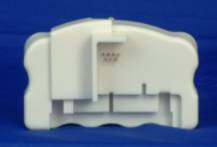 figure 5 figure 5  figure
6 figure
6 |
TROUBLESHOOTING1.After the red LED flashes, it stays on and doesn’t turn green a). The pins on the resetter are not in good contact with the chip on the cartridge. The contacts may have dirt or residue on them. b). If the ink cartridge is not an original Epson brand ink cartridge, the chip may be not compatible with the resetter. c). If the ink cartridge is an original Epson brand ink cartridge, the chip may be burned out or Epson may have changed the chip design. The Chip Resetter still can work with this kind of ink cartridge to reset the ink level, only the green light won’t shine, the red LED does. 2.The printing quality is not up to standard a). The quality of the ink you are using may be inferior. We recommend using inks that are specifically matched to Epson’s original colors and other characteristics. (Especially if you are printing digital photographs and expect to achieve matching colours.) b). Air bubbles trapped in ink. To avoid this, inject the ink VERY slowly. Also, allow the cartridge to rest for 24 hours with the ink exit nozzles facing down before using. |



Tel: 01578-730477
Tel: 01578-730478
Mobile: 07740 37 88 24
Whatsapp: 00447740378824
Ink-Man.co.uk
Stow Mill
Stow
Galashiels
TD1 2RB
All Brand Names & Trademarks are acknowledged | E&OE Prices may vary
without notice


 figure
3
figure
3 
